ui — on-screen UI toolkit
The on-screen UI toolkit: every way we put text, menus, and overlays on a player's screen. Other resources call it instead of re-implementing them, so the look and behaviour stay consistent. It hosts the NUI main menu (the player-facing hub) plus the messaging channels, the egocentric match HUD (objective bar + squad banner + TAB ranked board + kill feed, NUI), and the spectator camera.
The whole toolkit is NUI (HTML/CSS/JS): main menu, in-match HUD/board/kill feed, and every messaging channel. Nothing draws with GTA natives anymore — and the stock GTA chrome (radar, HUD widgets, native pause menu) is suppressed everywhere by the toolkit. The
exports.ui:*API is the stable seam.
It exposes the same API on the client and the server:
- Client functions act on the local player:
exports.ui:notify('Hi'). - Server functions take a target first (a player server id, or
-1for everyone) and forward the call over the network:exports.ui:notify(src, 'Hi').
Which channel for what
| Function | Where it shows | Use it for | Lifespan |
|---|---|---|---|
notify | Feed, top-left | Brief, secondary info ("+1 frag", "X joined") | transient |
subtitle | Bottom-center | Short instruction ("Capture the point") | ms |
help | Box, top-left | Controls / reminders ("Press E") | while shown |
bigMessage | Centered shard | Dramatic moment (round start, victory) | ms |
countdown | Centered + sound | "3… 2… 1… GO!" | duration |
playSound | — | Reinforce a key moment (beep, win) | one-shot |
Rule of thumb: persistent state (score, timer) belongs in a per-frame HUD, not here. This library is for events and prompts.
Tones
GTA colour codes (~r~ …) are dead. Meaning travels as a tone on the
payload: info (default) · success · warn · danger · you. The NUI maps
a tone to the design-token accent (left border on notifications, tint on the
big-message shard). Example: { tone = 'danger', message = 'Out of bounds!' }.
Client API
Every channel takes a plain string for the common case, or a table
for the full shape; nil hides the persistent ones (subtitle, help).
exports.ui:notify(n)                 -- string, or { tone, icon, title, message, duration }
exports.ui:subtitle(text, ms)        -- bottom line (ms default 3500; 0 = sticky; nil text hides)
exports.ui:help(h)                   -- { title?, rows = { { keys = {'TAB'}, label = '…' } } }; nil hides
exports.ui:bigMessage(b, ms)         -- string, or { eyebrow, title, subtitle, tone } (ms default 4000)
exports.ui:countdown(seconds, onGo)  -- 3->2->1->GO with beeps; calls onGo() at GO
exports.ui:playSound(name, set)      -- frontend sound (audio stays native)
Example — client side:
exports.ui:notify({ tone = 'success', message = 'Loadout received' })
exports.ui:countdown(3, function()
    -- runs locally when the countdown hits GO
    enableControls()
end)
Main menu (NUI)
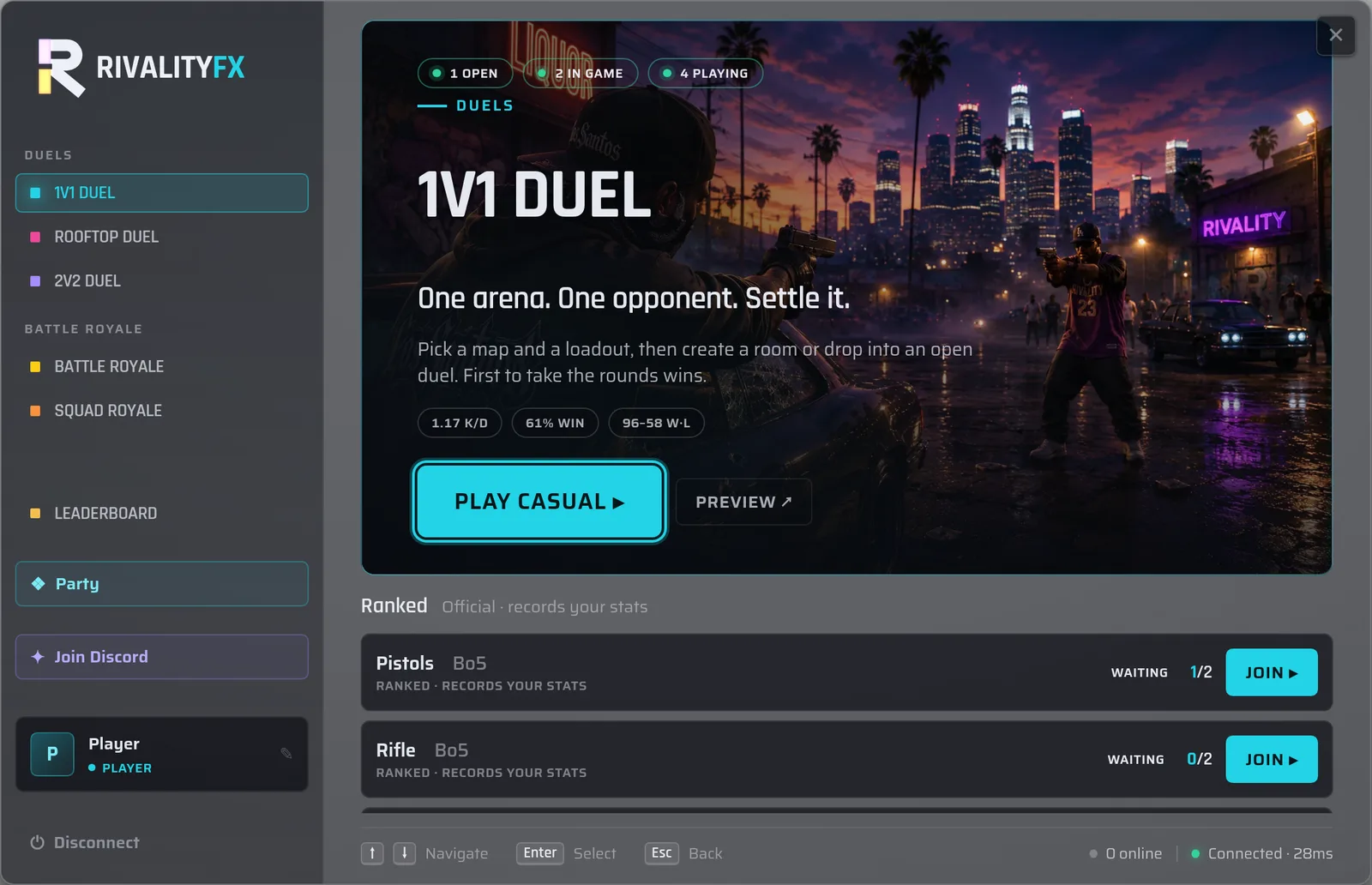
The player-facing menu is an NUI overlay (HTML/CSS/JS, vanilla — no build
step). It replaces the old native role-select as the menu the
player sees. lobby opens it on spawn and on the menu key (M).
The menu lands on the selected mode's cover: its splash art (present.hero),
live activity badges (open / in game / playing), your ranked record, a Play
casual button into the casual arena browser, and the mode's ranked slots.
The left rail is the mode selector; Preview links out to the mode's page.
exports.ui:openMainMenu()    -- show the menu + capture mouse/keyboard (NUI focus)
exports.ui:closeMainMenu()   -- hide the menu + release input focus
exports.ui:isMainMenuOpen()  -- returns a bool
While open it takes NUI focus (mouse + keyboard) and suppresses GTA's pause
controls so ESC is delivered to the page (to step back / close) instead of
opening the pause menu.
Message contract (Lua ↔ page)
The Lua client and the NUI page talk over a thin bridge (exposed as
window.RfxBridge):
| Direction | Mechanism | Messages |
|---|---|---|
| Lua → JS | SendNUIMessage({ action, payload }) | menu:open (payload { config = { chrome, devRoleSwitcher }, data? } — data seeds MODES / CONN / PROFILE), menu:close, menu:data (payload merged into the page's state.data, then re-render — carries the live MODES / CONN / PROFILE) |
| JS → Lua | RfxBridge.post(name, data) → fetch('https://<res>/<name>') → RegisterNUICallback(name) | close (real: releases focus), party, and the arena intents arenaCreate / arenaJoin / arenaLeave / arenaSpectate / arenaDelete |
post(name, data) targets the page's own resource (ui). A NUI page may also
call another resource's callback with RfxBridge.postTo(resource, name, data) — the Appearance screen uses it to reach the
customization module (postTo('customization', …)).
Live data
The menu is wired to the engine: the lobby snapshot drives the mode covers
(hero + live pop badges), the casual arena browser, the per-mode ranked slots,
the create-form options, and the player profile; the arena intents (arenaCreate
/ arenaJoin / arenaLeave / arenaSpectate / arenaDelete) forward to the
engine:arena:* net events
(lobby contract).
The page keeps bundled mock data only as a browser-preview
fallback (opening the page outside FiveM).
Profile & rights. PROFILE = { name, rank, tier, initials } is built per
player server-side by the engine (in the lobby snapshot) from FiveM only —
no DB: name from GetPlayerName, tier from ACE perms (player < vip < staff < admin,
mapping is admin config — see config), rank a label from the tier.
The page reads PROFILE.tier to gate the locked modes, Private arenas and the
Staff console. Career stats (K/D + W/L/D, per mode) ARE persisted now — a
license-keyed server-KVP store rides along in
PROFILE.stats, and the active mode's cover renders your record chips. (tier/
rank stay live-derived from ACE, never persisted.)
Presentation knobs (panel vs full-screen chrome, the dev "View as" rights switcher) are static config on the
uiresource — see config.
Dialog (toolkit primitive)
A standalone confirm / prompt / choice modal, independent of the main menu, so the engine or any resource can ask the player something at any time — including mid-match, where the menu is suppressed. It renders on its own NUI surface and takes NUI focus while shown. This is the toolkit's interaction primitive.
Options (plain data — identical on client, server, and page):
| Key | Meaning |
|---|---|
kind | 'confirm' (default), 'prompt' (adds a text input), 'choice' (a list of option buttons) |
tone | 'default' or 'danger' (red accent for destructive actions) |
title, message | header + body text |
input | { placeholder, password } — kind='prompt' only |
options | { { id, label }, … } — kind='choice' only |
confirm, cancel | { label }; cancel = { hidden = true } removes the cancel button |
dismissable | false to require an explicit answer (Esc / click-out won't cancel). Default true |
Result (passed to the callback):
| Outcome | Result |
|---|---|
| confirm | { ok = true } |
| prompt | { ok = true, value = '<text>' } |
| choice | { ok = true, id = '<chosen>' } |
| cancelled / dismissed | { ok = false } |
Client — ask the local player
exports.ui:dialog({
    kind = 'confirm', tone = 'danger',
    title = 'Forfeit the match?',
    message = 'Your opponent takes the win.',
    confirm = { label = 'Forfeit' }, cancel = { label = 'Keep playing' },
}, function(res)
    if res.ok then TriggerServerEvent('engine:forfeit') end
end)
Only one dialog shows at a time; opening another supersedes the first (which
resolves { ok = false }).
Server — ask ONE player, get the answer back
The result round-trips over the network by request id (a callback can't cross the
network — same reason as countdown's onGo). Target a single player id; to ask
several players, call it once per player.
exports.ui:dialog(src, {
    kind = 'confirm', title = 'Victory -- run it back?',
    message = 'Final score 5-3. Rematch?',
    confirm = { label = 'Rematch' }, cancel = { label = 'Leave' },
    dismissable = false,
}, function(res)
    if res.ok then --[[ rematch ]] else --[[ they left ]] end
end)
A player who disconnects before answering resolves as { ok = false, disconnected = true }.
Dev/QA:
/uidialog [confirm|prompt|choice]opens a test dialog and notifies its result, so you can eyeball the primitive without a full match.
Party panel
A focused, lightweight group surface, separate from the main menu: a player
opens it with a key (Config.partyKey, default G, rebindable in FiveM's
Settings) to invite friends, see the squad, kick (owner) and leave.
Parties are invite-first and grow organically — a solo player invites someone,
they accept, and the party materializes (the inviter is the owner); the owner
keeps inviting up to rfx_group_max. Non-owner members can only leave.
- The always-on lobby status widget (bottom-right) glances the state — "Inviting X…" then the squad roster — passively; it has no input focus, so all management happens on the panel.
- An inbound invite pops a focused Accept/Decline prompt via the standalone Dialog, so the invitee answers without opening anything.
- Playing as a party is the normal team-mode flow: the owner joins a team-mode arena and the server places the whole party on one team.
Like the dialog, the panel is a standalone surface: the Lua side handles focus, the key bind and the inbound-invite prompt; the panel itself renders on its own NUI surface.
Server API
First argument is the target: a player server id, or -1 for everyone.
exports.ui:notify(target, n)         -- string or { tone, title, message, … }
exports.ui:subtitle(target, text, ms)
exports.ui:help(target, h)
exports.ui:bigMessage(target, b, ms) -- string or { eyebrow, title, subtitle, tone }
exports.ui:countdown(target, seconds)
exports.ui:setHud(target, data)      -- objective bar + squad banner (nil hides)
exports.ui:setBoard(target, data)    -- TAB ranked board data (nil clears)
exports.ui:killFeed(target, entry)   -- one kill-feed row (structured)
Example — server side (announce a round start to everyone):
exports.ui:notify(-1, 'Round starting in 3s')
exports.ui:countdown(-1, 3)
-- ...then run the round logic ~4s later (3s + the GO frame)
The
countdowncallback (onGo) only exists on the client — callbacks can't cross the network. From the server, trigger the countdown for the visual, and schedule your own server-side logic for when it ends.
Egocentric match HUD (NUI screen)
The in-match overlay — one mould for every squads layout (1v1 / 2v2 / NvN).
The payloads are EGOCENTRIC and carry no team identity: you + your squad
anchor the view, the field (everyone else) is a neutral counter. Colors live
in the design tokens ("you" = cyan accent, field = neutral ink), never in the
payload. The NUI page renders it; the Lua side is a pure relay. nil data
hides an element.
Three always-on pieces plus the TAB board:
- Objective bar (top-center): your score vs the field's, round/phase eyebrow, timer (amber when low), best-of pips, MATCH POINT escalation.
- Squad banner (bottom-left): your squad's state (alive/down/out, "YOU" tag). Hidden for a squad of 1 — in a duel you ARE the counter.
- Ranked board (hold TAB): ONE ranking of squads — rank, alive dots, score, colour-coded best ping (green < 60, amber < 120, red otherwise) — no team columns. The weapon wheel is suppressed while held. Data is pushed on the scoreboard cadence whether or not the board is open; the NUI caches it so opening is instant.
exports.ui:setHud(target, {
    round = 'ROUND 4', timer = '1:23', timerLow = false,   -- center cell
    you   = { label = 'YOU',      score = 2, target = 5 }, -- target nil = no cap
    field = { label = 'BADKARMA', score = 1, sub = nil },  -- sub e.g. '3 alive'
    squad = { { name = 'Sahid', alive = true, you = true } }, -- ≤1 → banner hidden
    -- neutral = true                                      -- spectator view (no "you")
})

exports.ui:setBoard(target, {
    title = '1v1 Duel', sub = 'Warehouse',
    metaLabel = 'First to', metaValue = '5',
    unit = 'player',                       -- 'player' (1v1) or 'squad'
    squads = {
        { name = 'Sahid', you = true, score = 2, ping = 24,
          members = { { name = 'Sahid', alive = true, you = true } } },
        { name = 'BadKarma', score = 1, ping = 51,
          members = { { name = 'BadKarma', alive = false } } },
    },
})
Kill feed (NUI screen)
Recent rows, top-right, fading after ~5s. Structured entries — the relation is
relative to the viewer (rel: 'you' | 'ally' | 'enemy', omitted = neutral);
"you"/"ally" render in the accent, the enemy stays neutral ink. No killer =
a plain "died" row.
exports.ui:killFeed(target, {
    killer = { name = 'Sahid', rel = 'you' },    -- nil for a no-killer death
    victim = { name = 'Bob' },
    -- weapon = 'Carbine', headshot = true       -- optional (not sent yet)
})
Spectator (screen)
A camera that follows one of a list of players; the arrow keys cycle. Client-driven:
exports.ui:startSpectate({ 3, 7, 12 })   -- server ids to follow
exports.ui:stopSpectate()
Appearance — cosmetic locker (NUI screen)
A screen inside the NUI main menu with two cosmetic axes on a Skins | Weapons
toggle: appearances — ped skins and freemode outfits, one shared catalogue —
and weapon wraps (kind='weaponTex', a global weapon tint). Each is pack tabs +
search/filter + a card grid + a sticky equip bar; locked packs swap
the grid for an unlock panel. It owns no cosmetic logic — it renders a catalog and sends
the player's picks to the customization module over the cross-resource bridge
(Bridge.postTo('customization', …)): getCatalog (appearances) / getWraps (wraps) /
preview / select / revert. Rights (locked/VIP packs) are gated from the player's
PROFILE.tier; the equip itself is server-authoritative. See customization for the
catalog, exports, and persistence.
Scaling — proportional to the client's resolution
The whole NUI is rem-based, and the root font-size (set by the design
tokens) is the single master scale. It is anchored to the client's vertical
resolution (100vh), never width:
root_px = 100vh * (--ui-ref-root / --ui-ref-h) * --ui-scale
        ≈ 20px @ 720p · 30px @ 1080p · 40px @ 1440p · 60px @ 4K   (--ui-scale 1)
Consequences, by design:
- Proportional to resolution — the UI keeps the same fraction of the screen
at any resolution. There is no upper cap; a small floor (
--ui-min-root, 18px) only protects legibility in tiny dev/preview windows. - Aspect-stable — height-anchored, so a 21:9 / 32:9 ultrawide gets the
same-size UI as a 16:9 screen of equal height (the menu panel centers with
more empty side margin instead of stretching). Because
1remis now itself a resolution-proportional unit, components size inrem; viewport units appear only asmin()/max()overflow guards for narrow windows.
Config tiers (see Server configuration):
--ui-ref-h/--ui-ref-root— the design baseline (root = 30px @ 1080p). Structural invariants — change them only to re-baseline the whole system.--ui-scale— static config, the server owner's master knob (1= design size; raise for a bigger UI, lower for denser). Edit in the design tokens.- A per-player override seam is reserved (client KVP
rfx:pref:ui_scale, same pattern asrfx:pref:skin) but is deliberately not wired yet (player prefs are DEFERRED).
Architecture
Internally the toolkit is split one concern per file behind the exports.ui:*
seam: a server-side mirror of the exports, client relays per channel (messages,
dialog, HUD, party, spectator) and the GTA-chrome suppression, plus the vanilla
NUI app they drive over the bridge. A piece that needs a shared helper (e.g.
sounds) reaches it through the export (exports.ui:playSound(...)) rather than
duplicating it. Consumers only ever touch the exports — the internal split is
not part of the contract and may change between releases.
How it's wired
- The client registers the real functions and exposes them with
exports(...). - The client also listens to
ui:*net events so the server can push a message to a specific player or to all. - The server exports are thin wrappers that just
TriggerClientEvent('ui:*', target, ...).
To use it from another resource, add a dependency in that resource's manifest:
dependency 'ui'